
Component: Promo A
The Promo A component provides a prominent full height and width block of content.
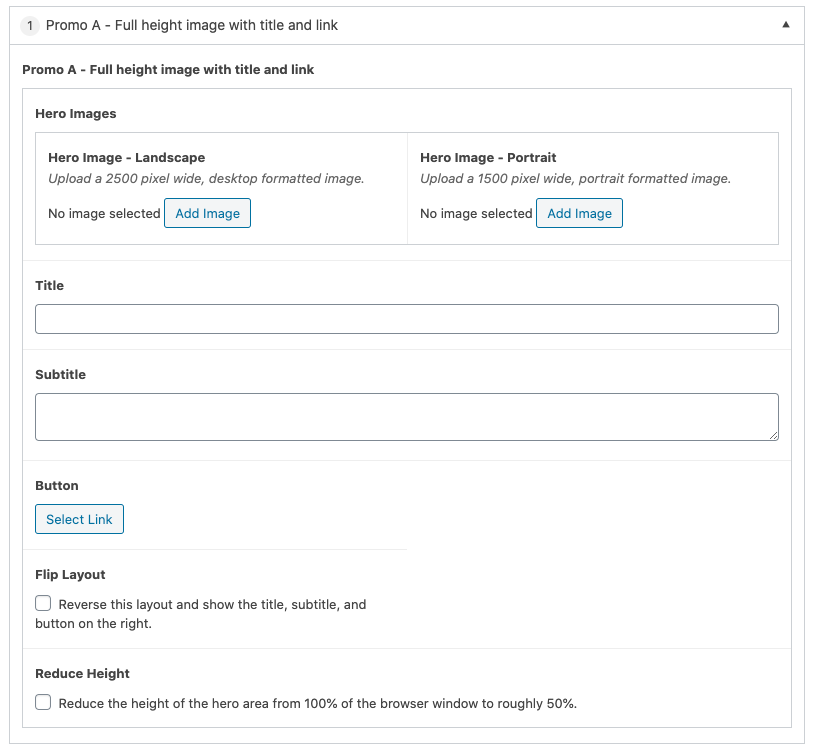
Settings
Hero Images
Hero Image – Landscape – Provide an image that will be used as the background of the component. Ideally, the image should be 2500px wide in a landscape orientation. The platform will crop images accordingly to assure they fill the viewport. This field is required.
Hero Image – Portrait – Provide an optional portrait orientation image that will be used on narrower screen sizes. If this option is not set, the landscape version will be used as the default.
Title
Provides a title that will be displayed on the component. This field is optional.
Subtitle
Provides an optional subtitle that will be displayed on the component. This field is optional.
Button
Provides a prominent button that can link to content/pages on your site or to external sites. This setting is optional.
Flip Layout
The Flip Layout setting allows you to alter the layout of the component by moving its title, subtitle and button to the right side. This setting only affects this instance of the component.
Reduce Height
The Reduce Height setting reduces the overall height of the component to be approximately 50% of the current browser window height for desktop (does not affect how the component is displayed on mobile). This setting only affects this instance of the component.