
Component: WYSIWYG Editor
The WYSWIYG Editor is a highly flexible component allowing you to add text, images and various 3rd party embeds to the page.
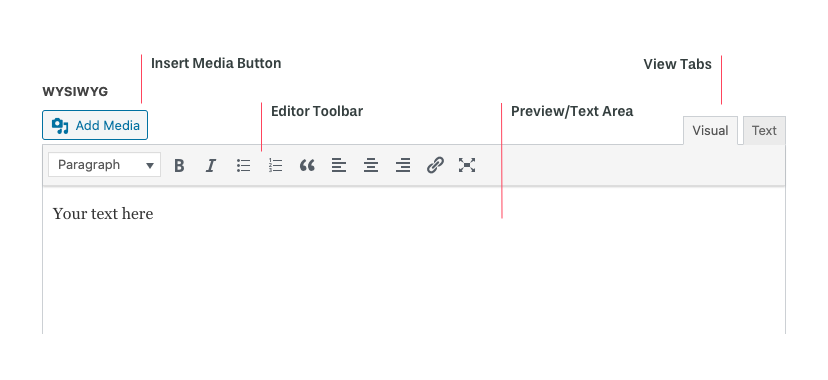
Working with the WYSIWYG Editor
The WYSIWYG Editor has various options at the top of the component.
- Insert Media Button allows you to insert images in various file formats as well as videos.
- Editor Toolbar provides several options for formatting:
- Text Style dropdown is used to select the desired pre-formatted text style (Paragraph, H1, H2, etc) to be applied to your text. These styles are preset when your site is designed. The styles applied to each text format can not be changed.
- Text attributes allows you to apply Bold or Italic styling to highlighted text.
- Bullet and ordered lists
- Blockquote allows you to highlight a block of text within your layout.
- Left justified, centered and right justified text.
- Link option to add a hyperlink to a highlighted block of text.
- View Tabs provide two different ways to view your content
- Visual provides a rough approximation of what your content will look like when published. Note, your font and site specific details might not show in this view.
- Text provides a “code” view to allow you to see the markup behind the content.
When working with the the WYSIWYG Editor, you can compose within the editor or copy/paste from an external document (Like Word, Google Docs).
Pro Tip: When copy/pasting from another doc, use your browsers “Paste and Match Style” command (Shift+cmd+v on Mac, Shift+ctrl+v on PC) to strip out hidden formatting that may cause issues with your sites styling.
Using Embeds
There are hundreds of 3rd party platforms and services that provide embed codes to be included on your site. Some popular embeds are:
- YouTube Videos
- External Forms
- Surveys
The compatibility with 3rd party embeds is highly dependent on the service provider.
To use an embed, copy and paste the services embed code in the “Text” view. Often, the embed will not preview correctly in the editor. Publish the page and preview in your web browser to make sure it is working as expected.
Alternatively, the platform will display the embed simply by pasting the URL of video, clip or other piece of content. Some popular supported services are:
- Youtube
For more information on which embed formats are supported by URL, you can find a complete list here.