
Workspace Overview
The Archie Platform Admin Workspace is the area where you perform content editing and creation as well as platform management such as administering users.
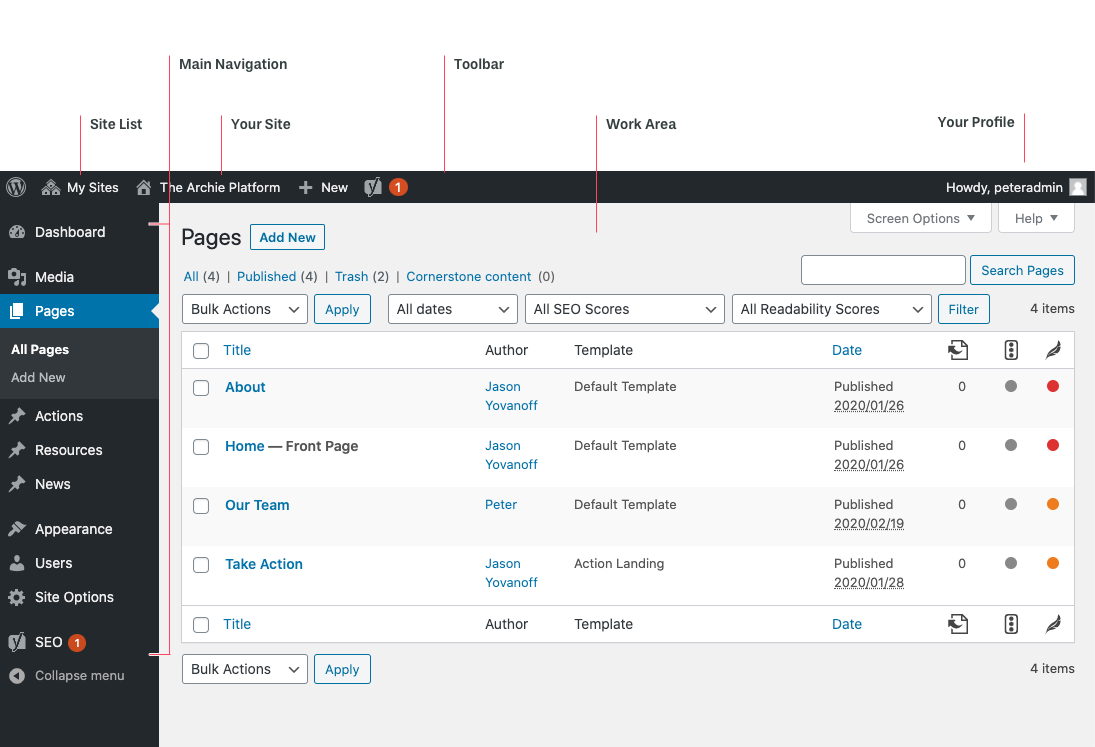
For anyone who has worked with WordPress, this should look familiar. Archie is built on top of the WordPress engine and shares many of the same features.
Toolbar
The toolbar at the top of the admin workspace contains quick links to your site as well as a site list if you have multiple Archie sites.
Additionally, you can quickly access your profile to make changes to your preferences.
Main Navigation Menu
The main navigation menu runs vertically down the side of the admin workspace in the sidebar. It contains all the major sections and options for your site. Note: If you have an Archie “Pup”, these options may look different.
There are different options under each main navigation item that changes based on your selection.
The main menu contains:
- Dashboard: Currently there are no feature for the dashboard. More coming soon.
- Media: Is the centralized location to upload and manage all images and videos within your site.
- Pages: Manages the creation and editing of all static pages. Typically, most of your site content lives on a page. Learn more about Pages.
- Actions: Manages the creation and editing of individual actions. Actions contain forms or links to a 3rd party site. Learn more about Actions.
- Resources: Manages the creation and editing of individual resources as well as resource categories. Learn more about Resources
- News: Manages the creation and editing of internal and external news items. Learn more about News.
- Appearance: Contains the the “menu” option to mange the main, footer and mobile navigation for your site.
- Users: Manages the various permissions for your site.
- Site Options: Contains a variety of site-wide settings.
- SEO: Allows you to manage how your site will appear in search results and when posted to social media. It also provides tools to optimize for SEO.
Work Area
The main work area changes depending on the navigation item or preference you select. This area will contain lists of features, pages as well as components to edit based on your view.